When we affirm that “Jaltest
is much more than diagnosis”, we are talking about the images, pictograms, charts
and diagrams available in our software, aimed at making the repair and checking
of the vehicle easier.
Showing posts with label troubleshooting. Show all posts
Thursday, November 12, 2015
Tuesday, July 9, 2013
Quick Guide for Jaltest Troubleshooting
Did you know that, since version 13.1, Jaltest Soft includes a functionality that allows you to identify the failure and repair the vehicles by their symptoms?
Thanks to this new function, we can face a repair work that we have never done before; even without being connected to the vehicle.
In this post, you will learn how to quickly perform a Troubleshooting with Jaltest.
Let us suppose that we have a Volvo FH12 E98 which expels white smoke, a failure we had never seen before until now.
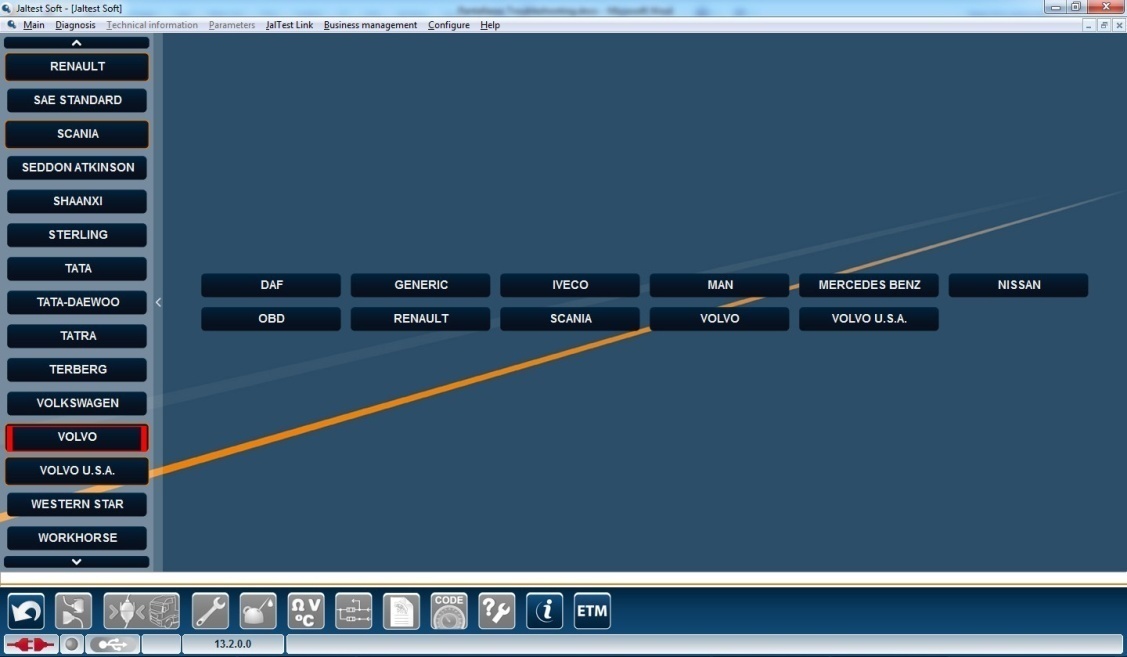
We would simply have to connect Jaltest Link to our computer, either via USB or Bluetooth, and choose the option “truck” on the main menu, as shown on the picture below.
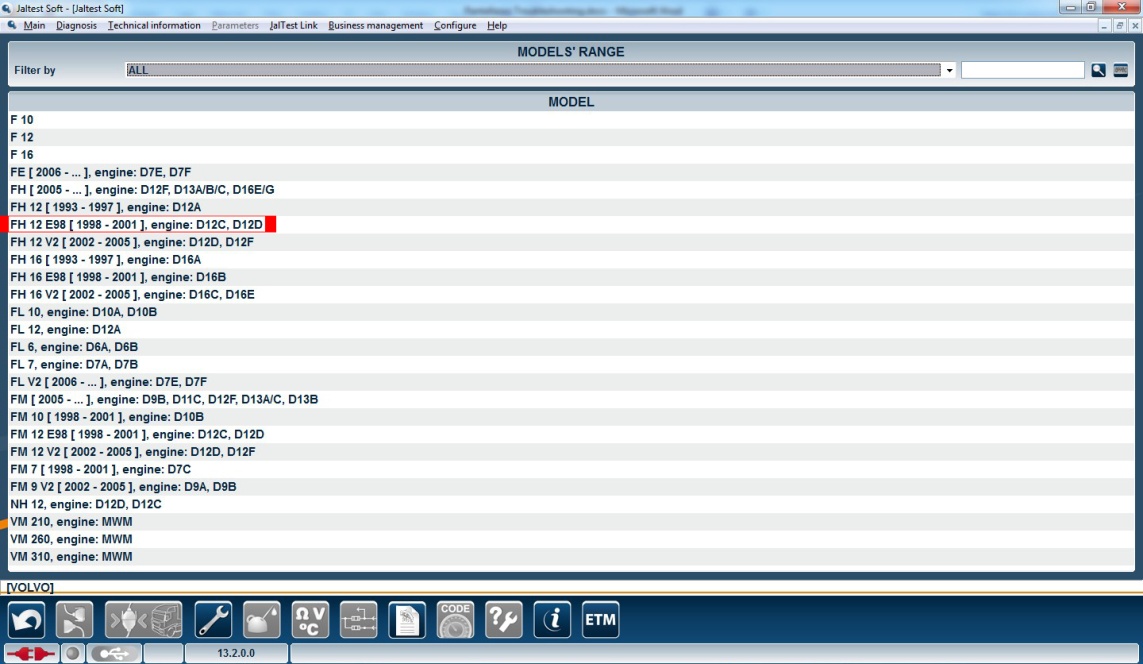
Then, we choose the brand and model, which in this case would be Volvo >>FH12E98


After choosing the brand and model, we just have to click on the icon for this new functionality, which is the icon containing a question mark and a wrench, marked in red on the picture below.
Once we have clicked on this icon, a list with the symptoms that our vehicle may have will be displayed. Then, we choose the symptom of our Volvo, which in this case is “the engine ejects white smoke”. After that, on the right side of our screen, we will get all the steps to follow in order to repair the failure. We simply have to follow those steps and, in case we find some difficulties, we could always refer to the Jaltest Technical Assistance in order to ask for help.
This new functionality is a quick and easy repair protocol which may save our customers a lot of trouble. In short, the goal of the Jaltest Project is to put all the tools, whether technological or human, at the disposal of our customers in order to make their daily work at the repair workshop easier.
Lorena Manzanares Franco
Customer Service Department.
Monday, June 3, 2013
Jaltest software: quick and easy-to-use!
The Jaltest software is the most intuitive diagnostic software there is within the multibrand diagnostic market. Thanks to the clear and complete structure of this software, the users can access all the functions which are necessary to perform diagnosis on commercial vehicles in a quick, easy and efficient way.
One of the options that improve the speed and accessibility when using the Jaltest software is the function – search filter. This function allows the users to work exclusively on the data they need.
Thanks to the variety of filters, in a few seconds, the user can find all the information which is relevant for him:
A) Vehicle models
B) Systems to diagnose
C) Locations of components on wiring diagrams
D) Troubleshooting by symptoms
E) And much more...
The Jaltest software offers a wide variety of benefits to make the diagnosis much easier and much more efficient.
Drive with US!
Cojali S.L.
Export Department
Wednesday, February 13, 2013
Jaltest Soft, New functions 13.1
As with
every new version, this time also, we have tried to overcome ourselves,
bringing to our clients new ways of developing their business and partnership.
The new
version 13.1 of Jaltest Soft is aimed to make our lives easier, so these are
the new functions we have included:
- Jaltest iParts: a module, which will help you to identify and cross part numbers fast and easily.
- Troubleshooting by symptoms and error codes: an extra help to identify and correct errors.
- Shortcuts to special functions: it will take you directly to those actions, which are mostly found on each model.
- Customized group of measures: you can create your own measures guideline for each system.
- System technical data: text filter and direct access to print.
- Screenshot, option to print directly in the diagnosis report.
- Help for wiring diagrams: comments, notes, symbol and abbreviations description.
- Jaltest feedback: you can send your comments to our Technical Assistance team directly from Jaltest Soft.
- Window for information about Jaltest firmware version has been removed. It will pop-up only in inconsistency cases.
Labels:
diagnostic,
errors,
functions,
jaltest,
multibrand,
new,
soft,
troubleshooting
Subscribe to:
Posts (Atom)